
Four smart split modes
Split equally, by exact amount, by percentage, or by shares. Add tax & tip on top. The math is always right.
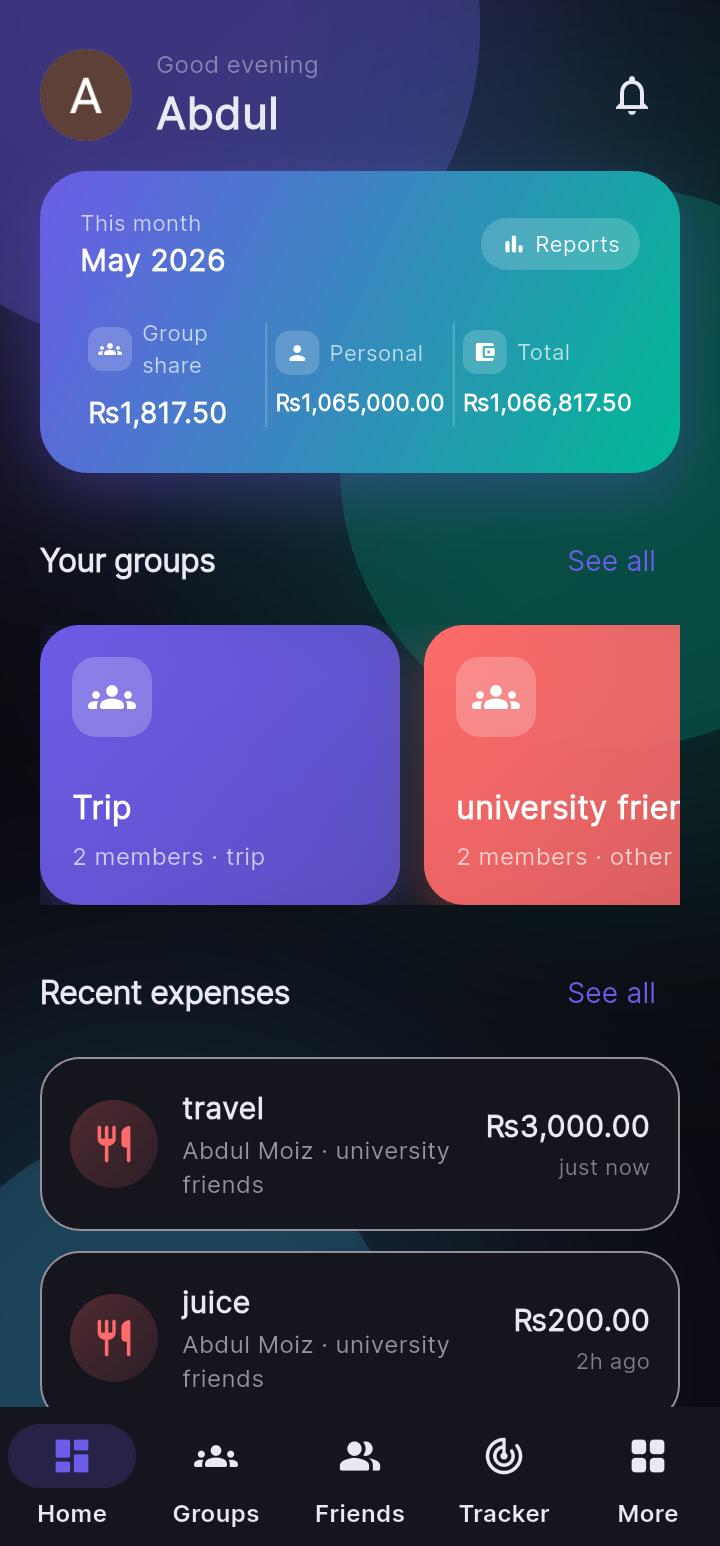
Expensplit makes it effortless to track shared expenses, settle debts and manage personal finance with friends, family, roommates and trips — beautifully designed, lightning-fast, and always in sync.
4
Smart split modes
∞
Groups & members
< 1s
Real-time sync
0 ads
Always
Features
Designed for real life — trips, flatmates, partners, families and friends. Expensplit removes the friction so you can focus on what matters.
Split equally, by exact amount, by percentage, or by shares. Add tax & tip on top. The math is always right.
Trips, roommates, families, lunch crews. Create unlimited groups, invite by email or by QR code.
Greedy debt simplification finds the fewest payments needed. Record settlements and watch balances zero out.
Add an expense on your phone — your friends see it instantly. Powered by Socket.io across all devices.
See where your money goes with category breakdowns and beautiful charts. Personal & group spending insights.
Track personal expenses alongside shared ones. Budget categories, recurring expenses, and exportable reports.
Generate a QR code or 6-digit invite code so friends can join your group in seconds — no contact upload needed.
A timeline of every expense, settlement and group event — per group or across everything you participate in.
JWT auth with refresh-token rotation, encrypted token storage, and no ad-tech tracking. Your data stays yours.
How it works
Make a group for your trip, flat, family or any plan. Invite friends by email or share a QR code.
Log shared expenses with one of four split modes — equal, exact, percentage, or shares. Tax & tip supported.
Expensplit shows who owes whom in real time, and simplifies debts so settling takes the fewest payments.
Record a payment when you settle up — outside the app or via your favourite payment method. Done.
For everyone
Track every meal, taxi and hostel. Settle at the airport — not weeks later.
Rent, utilities, groceries. Recurring expenses keep themselves up to date.
Shared categories for date nights, bills and savings goals. Privacy by design.
Dinner, drinks, ride-shares. Don’t be that person doing math at the table.
Rotate who pays. Expensplit tracks balances so it’s always fair.
Birthdays, weddings, secret santa. Pool money and settle in a tap.
Loved by users
“Finally an expense splitter that doesn’t feel like a spreadsheet. The QR group invites alone are worth it.”
“We use it for the flat — rent, groceries, bills. The debt simplification is genuinely magic at end of month.”
“I tracked my freelance expenses alongside our family budget. Beautiful charts, easy export. 10/10.”
FAQ
Yes. Expensplit is free to download and use. There are no ads and no hidden fees. We may introduce optional premium features in the future, but the core experience will always remain free.
You can split expenses equally, by exact amount, by percentage, or by shares. You can also add tax and tip on top of any split.
Yes. You can view groups, add expenses and browse history offline. Changes sync automatically when you’re back online.
Expensplit records settlements between members so balances zero out. We do not process payments — use your preferred payment method (bank transfer, JazzCash, EasyPaisa, Venmo, PayPal, etc.) and mark the settlement in the app.
Yes. We use industry-standard encryption in transit (TLS) and at rest, JWT authentication with refresh-token rotation, and we never sell your data. Read our Privacy Policy for full details.
Yes — you can request account deletion at any time from the app Settings, or via our Delete account page. All your personal data is permanently removed within 30 days.
Join thousands using Expensplit to track, split and settle expenses with the people they love. It's free, fast, and refreshingly simple.